HomeFeaturesPricingDocumentationContactDOWNLOAD

Run your sites on facts, not vibes

Scan your live site, source code, and connected services to detect issues and prevent regressions using deterministic checks, not AI guesswork.

Find and fix the issues that AI misses, right on your desktop

350+deterministic checks across your site and codebase

SiteCMD catches issues from SEO and performance to security holes, dead links, and AI-generated slop

Web Scan audits your running site. Code Scan reads your source code. Both run 100% on your machine, and their findings merge into one list, ranked by risk, with the exact fix ready for you or your AI agent.

Web Scan

  • Security30+ checks

    Headers, SSL, CSP, mixed content, exposed files, cookies, clickjacking

  • Performance20+ checks

    Core Web Vitals, compression, cache policy, render blocking, image optimization

  • SEO35+ checks

    Canonicals, robots, sitemap, structured data, indexability, meta tags

  • Accessibility50+ checks

    axe-core WCAG 2 A/AA engine plus native checks: contrast, ARIA, focus order, headings, landmarks

  • Compliance10+ checks

    Privacy policy, cookie consent, data retention, legal footer

  • Polish20+ checks

    Framework defaults, placeholder copy, AI aesthetic, HTML quality, meta gaps
Code Scan

  • AI safety15+ checks

    Timeouts, rate limits, spend caps, and observability on your AI integrations. Loop detection, output caps, and concurrency safety on every model call.

  • Supply chain10+ checks

    Vulnerable packages, outdated majors, license risk, lockfile drift

  • Security30+ checks

    Hardcoded secrets, exposed .env files, broken auth flows, unsafe request validation, webhook gaps

  • Database8+ checks

    Migration drift, missing foreign keys, unsafe ORM patterns, schema-vs-runtime mismatch

  • Architecture25+ checks

    Tight coupling, circular deps, dead code, leftover scaffolding

  • Operations20+ checks

    console.log as error handling, debug code in production, missing rollbacks, broken error reporting

Issue

AI provider SDK appears in client-side code

CriticalAI · 2 locations
01What was found

An AI provider SDK is imported in code that ships to the browser, in 2 locations. The code scan flags provider clients (OpenAI, Anthropic, and others) that run outside a server boundary. Calling an AI provider from the browser exposes your API key in the bundle - anyone can extract it and run up your bill - and it can leak prompts and user data.

02Where it lives
  • src/lib/ai-client.ts

    Anthropic SDK imported in a browser bundle

  • src/components/Assistant.tsx

    Provider API called directly from a client component

03How to fix
  1. Move every AI SDK call into a server route, edge function, or backend service.
  2. Read the API key from a server-only environment variable, never a public/VITE_/NEXT_PUBLIC_ one.
  3. Have the browser call your own endpoint instead of the provider directly.
  4. Rotate the exposed key - treat it as already compromised.

Issue

No Content-Security-Policy header

HighSecurity
01What was found

The site responds without a Content-Security-Policy (CSP) header on its HTML documents. A CSP is a primary defense against cross-site scripting and content injection. Without one, a single injected script can run with full access to your page and your users.

02Where it lives
  • https://example.com - all routes
03How to fix
  1. Add a Content-Security-Policy response header at your server or CDN.
  2. Start in report-only mode to surface violations without breaking anything.
  3. Scope script-src and style-src to your own origins plus nonces or hashes.
  4. Once report-only is clean, switch the policy to enforcing.

Issue

robots.txt blocks all crawlers

HighSEO
01What was found

Your /robots.txt returns Disallow: / for all user-agents, telling every search engine not to crawl the entire site. Search engines can't index what they can't crawl, so a site-wide disallow can quietly drop you out of search results entirely.

02Where it lives
  • public/robots.txt

    Disallow: / under User-agent: *

03How to fix
  1. Open /robots.txt and find the Disallow: / rule under User-agent: *.
  2. Remove it, or scope it to only the paths that should stay private.
  3. Explicitly allow the sections you want indexed.
  4. Re-submit your sitemap in Google Search Console to speed up recrawling.

Issue

Form inputs missing labels

HighAccessibility · 3 occurrences
01What was found

3 form inputs have no associated label and no aria-label, so assistive tech can't announce what they are for. Unlabeled inputs are a WCAG failure: screen-reader users can't tell what to type, and missing labels are a common source of accessibility complaints and legal risk.

02Where it lives
  • /contact
  • /signup
  • /newsletter
03How to fix
  1. Add a <label> tied to each input's id.
  2. Where a visible label isn't wanted, add aria-label or aria-labelledby instead.
  3. Re-run the scan to confirm all 3 are resolved.

Issue

Below-fold images not lazy loaded

MediumPerformance
01What was found

Images below the fold load eagerly on first paint instead of deferring until they are near the viewport. That competes for bandwidth with content the user can actually see, slowing your Largest Contentful Paint.

02Where it lives
  • / - home page, below the fold
03How to fix
  1. Add loading="lazy" to below-the-fold <img> tags.
  2. Keep your above-the-fold / LCP image eager so it isn't delayed.
  3. Set explicit width and height to avoid layout shift as images load.

Alert

Deploy dropped the Web Scan score by 12 points

CriticalSiteCMD - 2h ago
01What happened

3 commits landed between the last two scans (a1b2c3d..e4f5a6b). 2 new findings appeared and 1 resolved. The commit range is the blame window.

02What to check
  1. Review the 3 commits in the blame window (a1b2c3d..e4f5a6b).
  2. Open the 2 new findings to see exactly what regressed.
  3. Fix or roll back, then re-scan to confirm the score recovers.

Alert

Traffic drop: 41 visitors (78% below average)

WarningPlausible - 5h ago
01What happened

Plausible saw 41 visitors on 2026-06-14, compared with a 186/day 30-day average. Check deploys, campaigns, tracking changes, and outage history before assuming this is normal.

02What to check
  1. Check for a deploy or analytics-snippet change around 2026-06-14.
  2. Confirm the tracking script still fires on every page.
  3. Rule out an outage or a campaign that just ended.

Alert

Monitor down: Production

CriticalUptimeRobot - 9h ago
01What happened

UptimeRobot reports Production (https://example.com) is down. The latest down log has lasted 9m 12s. Check hosting, DNS, deploy status, and monitor error details before marking it resolved.

02What to check
  1. Check hosting and server status first.
  2. Verify DNS and TLS aren't failing for the domain.
  3. Confirm the latest deploy didn't break the entrypoint.

AI hallucinates and guesses, costing you time and money

SiteCMD was built based on decades of real world development experience, not a weekend of prompting. We don't use any AI analysis, instead we use hard data and deterministic checks to make AI more reliable and efficient while keeping it in check.

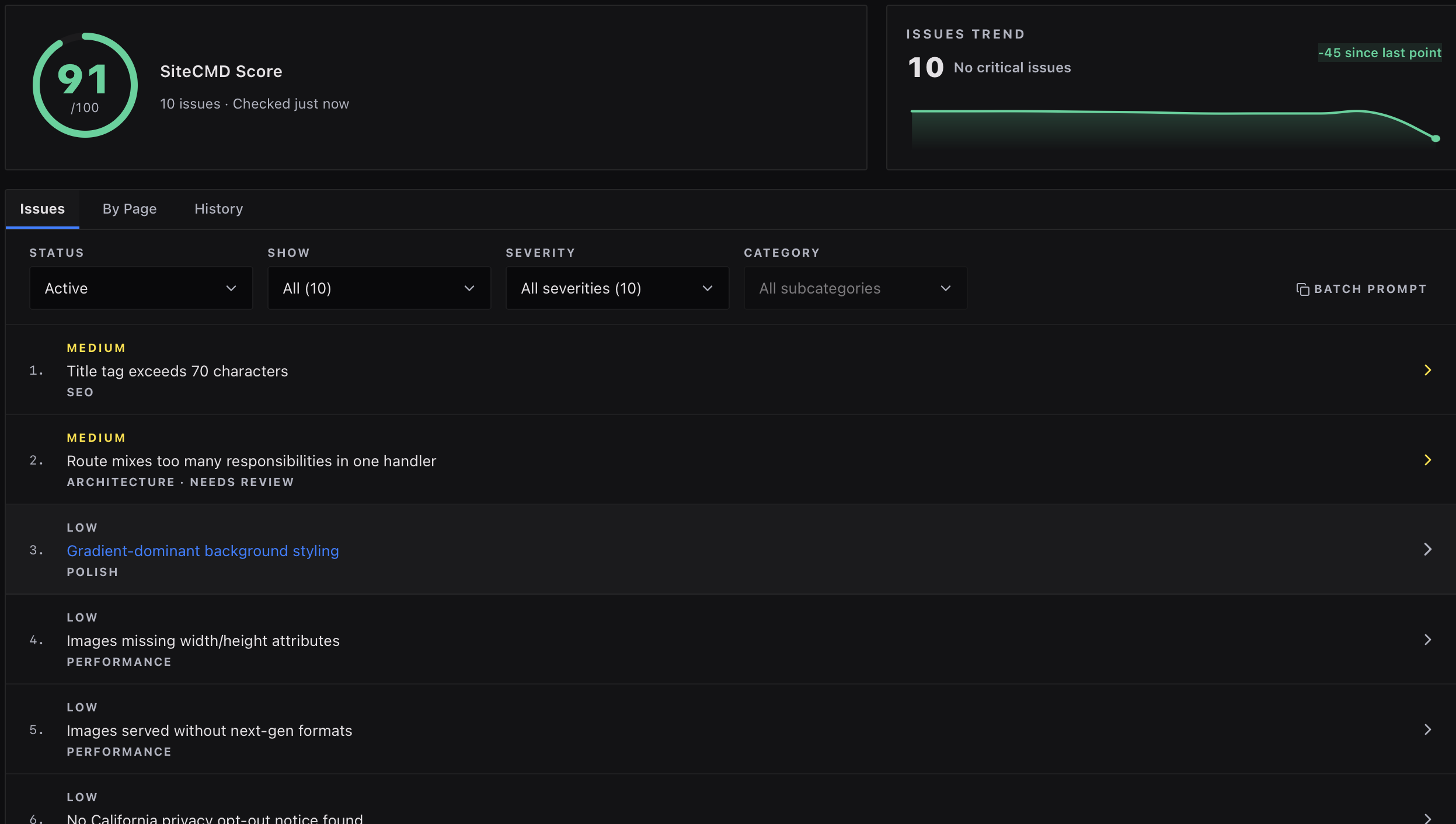
Stop blindly trusting AI to find and fix issues for you, now and before each deploy. Your users (and your wallet) will thank you.

SiteCMD scan results showing critical issues on a recently deployed site.

Your tools know things that your agent doesn't

The drop in organic traffic is in Search Console. The error spikes in Cloudflare. The slow page load times in Google Analytics. Your agent can't see any of it, burning tokens guessing at root causes.

SiteCMD pulls all data into one place your AI editor can actually read, and correlates the data with your website and code.

Google Analytics, Search Console, GitHub, Cloudflare, UptimeRobot, and Plausible signals flowing into the SiteCMD command center.

The safest place for your code is the machine it's already on

To scan a site or audit code, most tools want you to connect a repo, paste your API keys into their dashboard, or upload your source code to their servers. Now your credentials and your code live behind someone else's attack surfaces, and under someone else's data policy.

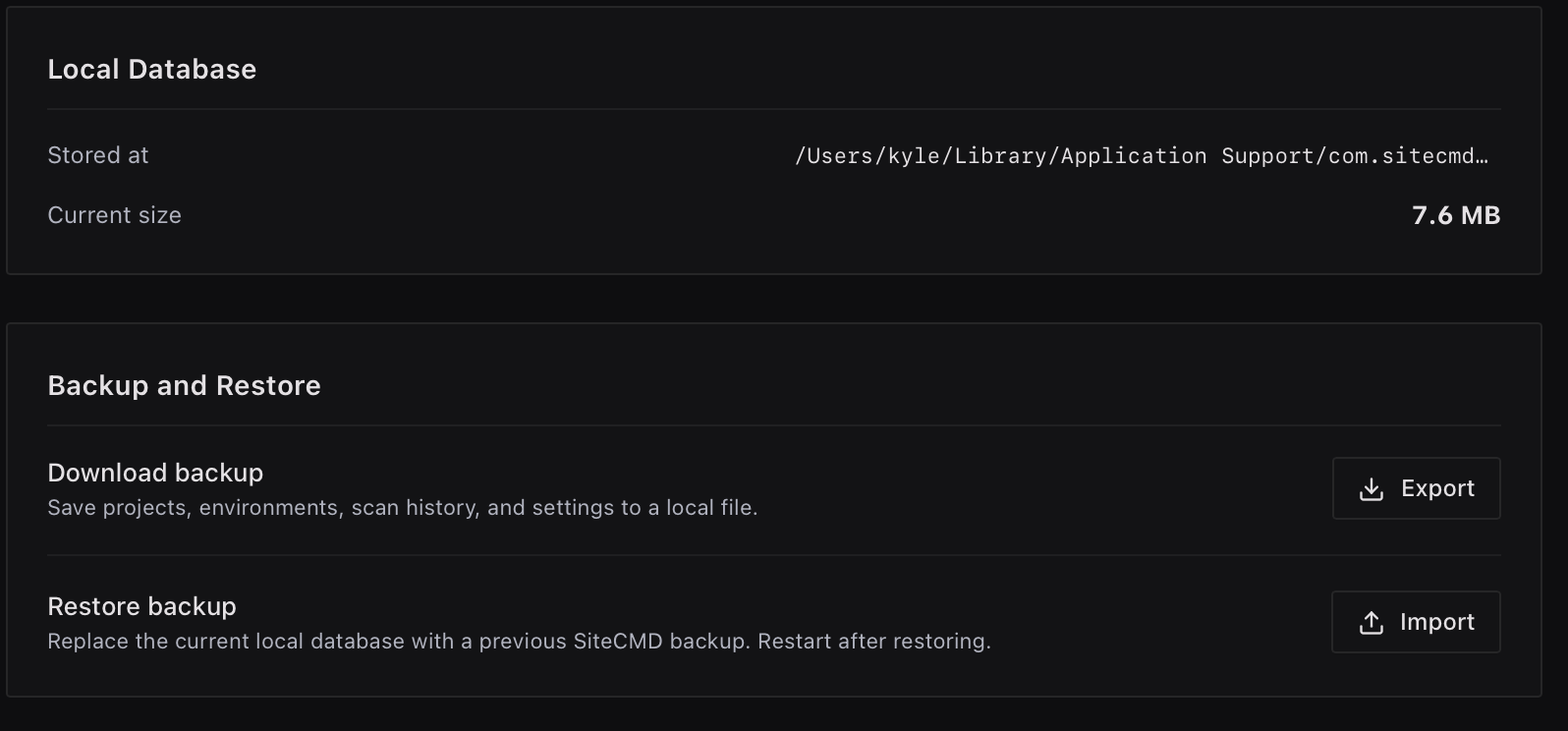
SiteCMD is a local-first desktop app. Your source code, scan history, and credentials never leave the device they are on, and are never transmitted to any cloud services.

SiteCMD settings showing the local database path and backup controls.

Spend less time debugging. More time building.

Add your site, code, and tools

Add your site URL and code repository or local directory of your code. Plug in Analytics, GitHub, and the rest of your stack.

Run your first scan

SiteCMD checks both layers, runs hundreds of deterministic checks, and hands you a list ranked by risk.

Fix it. Keep it fixed.

Send the top issue to your AI editor with a detailed fix prompt, or fix it yourself. SiteCMD keeps watching so the same issue doesn't ship twice.

Same agent. Now it stops guessing.

SiteCMD plugs into Cursor, Claude Code, Codex, and every other AI editor via MCP and CLI tools built right into the desktop app. Your editor stops guessing, so now it knows what's actually broken and where. Every scan is logged, so you can see exactly what your editor changed and whether it stuck.

Ready to take command?


Download Now